How to Set Compare Filter for WinMerge
(This blog article was migrated from our old website 111Tech.com) WinMerge is a popular source code comparing and merging tool on Windows platform. It can comapre both folders and files.
How to Set Compare Filter for WinMerge
In newer WinMerge version, the compare filter setting is changed, it does not use menus, but also use a filter setting file, the user can put more flexible filter rules there.
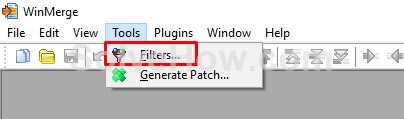
Open the filter setting from Tools > Filters.
Now we can create a New filter file or edit existing filter file. In our case, we have projects use C# most of the time, so we select the existing "Visual C# loose" to edit:
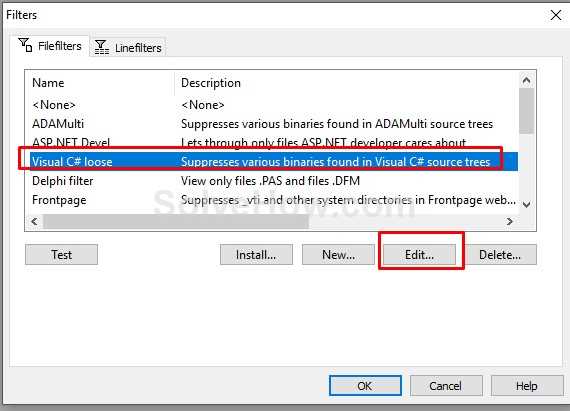
The existing "Visual C# loose" has included some lines for filtering some folders and files, but we need to filter out Bin and Obj folder, because we do not need to compare them. Also, in our case we are using Source Safe for source control, we need to filter out the file "vssxx.scc" files.
So I added filter code below:
## new added below

f: \.(vs[sp])?scc$

d: \\bin$
d: \\obj$
How to use the filter settings?
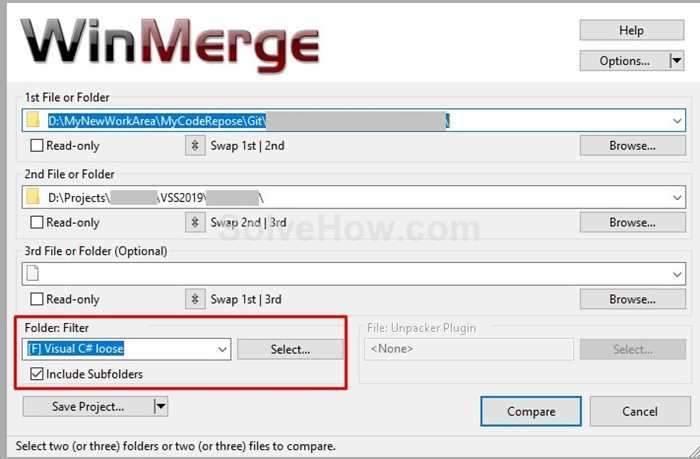
When you select folders or files to compare, you set the Folder Filter:
Search
Categories
Share
Site QR Code